evroc Agent Skills: Manage evroc infrastructure with your agent


Today we're releasing evroc Agent Skills, an open-source set of instructions that teach AI coding assistants how to work with evroc cloud infrastructure correctly. If you use Claude Code, Cursor, OpenCode, Codex, Hermes or any agent that supports the Agent Skills specification, you install the skills once and your agent knows how to provision and manage resources on evroc.
Seven skills covering compute, networking, storage, IAM, load balancers, Think Models, and Rancher deployments.
Available now on GitHub and the Cursor plugin marketplace
Getting Started
The skills work with Claude Code, Cursor, OpenCode, Codex, and any agent that supports the Agent Skills specification. You can install them globally or per-project. The full setup guide is in the evroc skills documentation.
CLI Install
npx skills add evroc-oss/evroc-skills
OpenCode
git clone https://github.com/evroc-oss/evroc-skills.git
mkdir -p .opencode/skills
cp -r evroc-skills/skills/ .opencode/skills/
Cursor (from the plugin marketplace):
Search for "evroc-skills" in the Cursor plugin directory.
What Agent Skills Actually Are
AI coding assistants are good at writing code but code without context can led to trouble.
Agent skills are markdown files (SKILL.md) that sit alongside your project. Each file contains a routing description, step-by-step instructions, CLI references, and completion criteria. When you ask your agent to do something, it reads the relevant skill and follows the instructions. The skill doesn't guess what the CLI looks like. It tells the agent exactly what commands to run and how to verify they worked.
The format follows the open Agent Skills specification, so any compatible coding assistant can discover and use them. You don't need a MCP server, an API integration, or a plugin runtime.
The Seven Skills
| Skill | What it manages |
|---|---|
evroc-compute | VMs, disks, snapshots, placement groups |
evroc-networking | Public IPs, security groups, subnets, VPCs |
evroc-storage | S3-compatible buckets, file stores (NFS), bucket service accounts |
evroc-loadbalancer | Backend pools, services, health checks, L4 routes, listeners |
evroc-iam | Projects, role bindings, service accounts, credentials |
evroc-think | Think Models: shared models, dedicated GPU instances, API keys, coding agent integration |
evroc-rancher | Deploy, inspect, and destroy Rancher Manager on evroc via Terraform |
Three Things You Can Do Right Now
1. Provision infrastructure from your editor
Ask your agent to set up a VPC, subnet, security group, and a VM. The skills know the dependency order: networking first, then compute. The agent creates each resource, verifies it with a completion check, and moves to the next.
> Create a VPC and subnet in the Stockholm region, then a security group
  allowing SSH and HTTP, then a VM running nginx.
The agent follows the skills in order. You get a running VM with the correct network configuration, no hallucinated flags, no skipped prerequisites.
2. Deploy a Rancher cluster without reading Terraform docs
The evroc-rancher skill includes Terraform templates, cloud-init configurations, and a prerequisite checker script. Ask your agent to deploy Rancher and it runs the prerequisite check, collects the inputs it needs (SSH key, admin password, node count), runs the deploy script, and polls until the Rancher URL returns 200.
> Deploy a Rancher Manager on evroc with 2 worker nodes in Stockholm.
The agent handles the Terraform provider download, the cloud-init provisioning, and the health checks. You don't need to read the Terraform docs or write the cloud-init YAML yourself.
3. Deploy a replicated Postgres behind a load balancer with S3 backups
This one covers four skills in a single request. The user describes the outcome, not the steps:
> Deploy a Postgres database replicated across the 3 different
  zones on evroc, install a load balancer between them, and use
  an S3 bucket as backup.
The agent reads the skills and figures out the pieces. It creates a security group allowing 5432 between the database nodes and one VM per zone, using the zone-scoped subnets the networking skill tells it about (default-se-sto-a, -b, -c). The compute skill supplies the cloud-init that installs Postgres and configures streaming replication, including the warning that cloud-init keeps running for several minutes after the VM reports Ready, so the agent waits for the replication to actually come up instead of trusting the VM status.
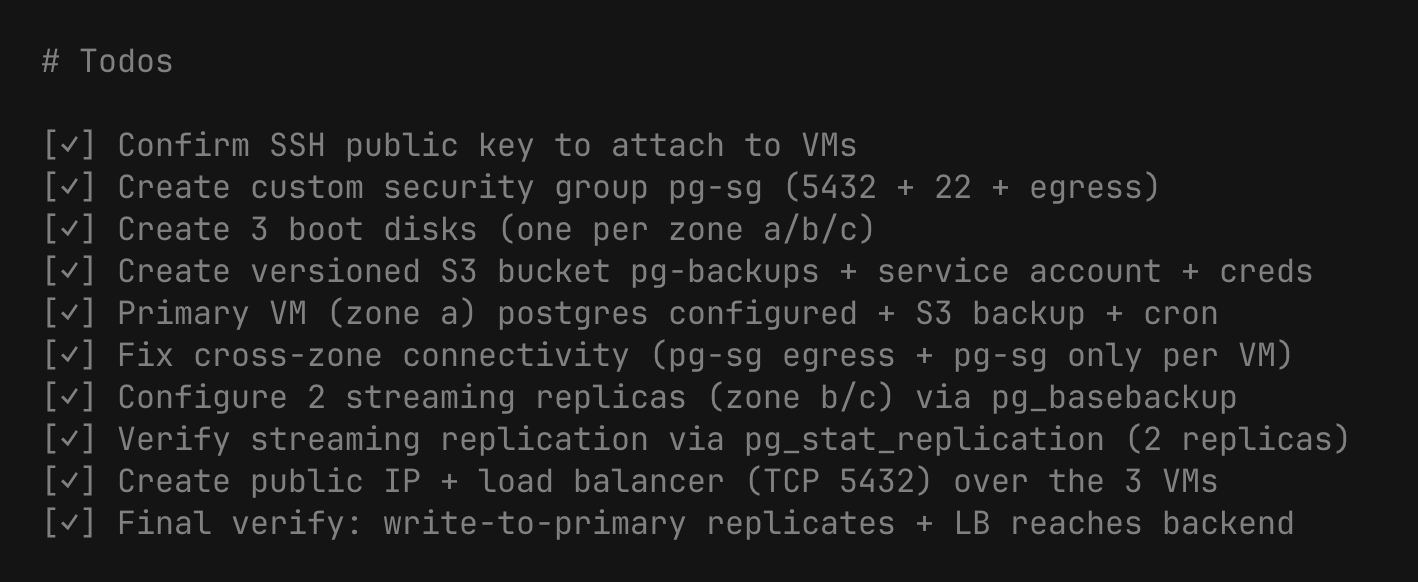
Nothing in the skills knows about Postgres. The skills know about evroc, the agent knows about databases, and the combination gets you a working replicated setup on the first attempt.
What's Next
If you find a gap, a wrong flag, or a workflow that could be better, open an issue or a pull request.
We're building out coverage for more evroc services. The current seven skills cover the core infrastructure layer. If there's a service you want to see next, tell us!
The skills repository is at github.com/evroc-oss/evroc-skills. The setup guide with per-agent instructions lives at Agent Skills Docs Page.
Written by