Getting Started with Self-Managed Kubernetes on evroc


If you want to run Kubernetes on evroc, you have two paths today. The first is the open-source stack where you provision and operate the cluster on evroc VMs using three evroc-maintained open-source components. The second is Rancher: you run SUSE Rancher Prime on an evroc VM and let it provision and manage clusters that delegate infrastructure creation to evroc.
Both paths are self-managed in the practical sense because the control plane, etcd, the Kubernetes version, and the upgrade cadence belong to you.
What evroc provides underneath is compute, networking, load balancers, and block storage, plus the glue that lets a cluster treat those things as native Kubernetes resources. This post walks through what each path looks like, how the components connect, and where each one fits.
What "self-managed" means on evroc
A Kubernetes cluster, any Kubernetes cluster, has two halves. There is the cluster itself: control plane, etcd, kubelets, CNI. And there is the cloud it runs on: VMs, subnets, load balancers, disks. On a managed service, the provider owns the first half and hands you an API endpoint. Self-managed means you own the first half and build it on the second.
That trade gives you control. You pick the Kubernetes distribution and version, you configure etcd, you choose your CNI and admission controllers, and you decide when upgrades happen. The cost is that the cluster's lifecycle is your responsibility, and doing that by hand, VM by VM with kubeadm, stops scaling after the first proof of concept.
So the interesting question is never "should I go self-managed" so much as "what automates the self-managed part for me". On evroc there are two answers.
Path one: the open-source component stack
Self-managed Kubernetes on evroc is delivered through three open-source components that each handle one layer of the cloud integration. The short version:
- Cluster API for evroc (CAPE) provisions and manages the lifecycle of clusters on evroc VMs.
- evroc CSI driver provides persistent block storage to pods, backed by evroc Disks.
- evroc Cloud Controller Manager (CCM) integrates evroc load balancers and public IPs with Kubernetes, and manages node lifecycle.
You can use them together for a fully integrated cluster, or adopt just one layer. If you already run a cluster on evroc VMs and only need persistent storage, you can install the CSI driver and stop there.
How they fit together
The three components cover the standard Kubernetes cloud-integration surface:
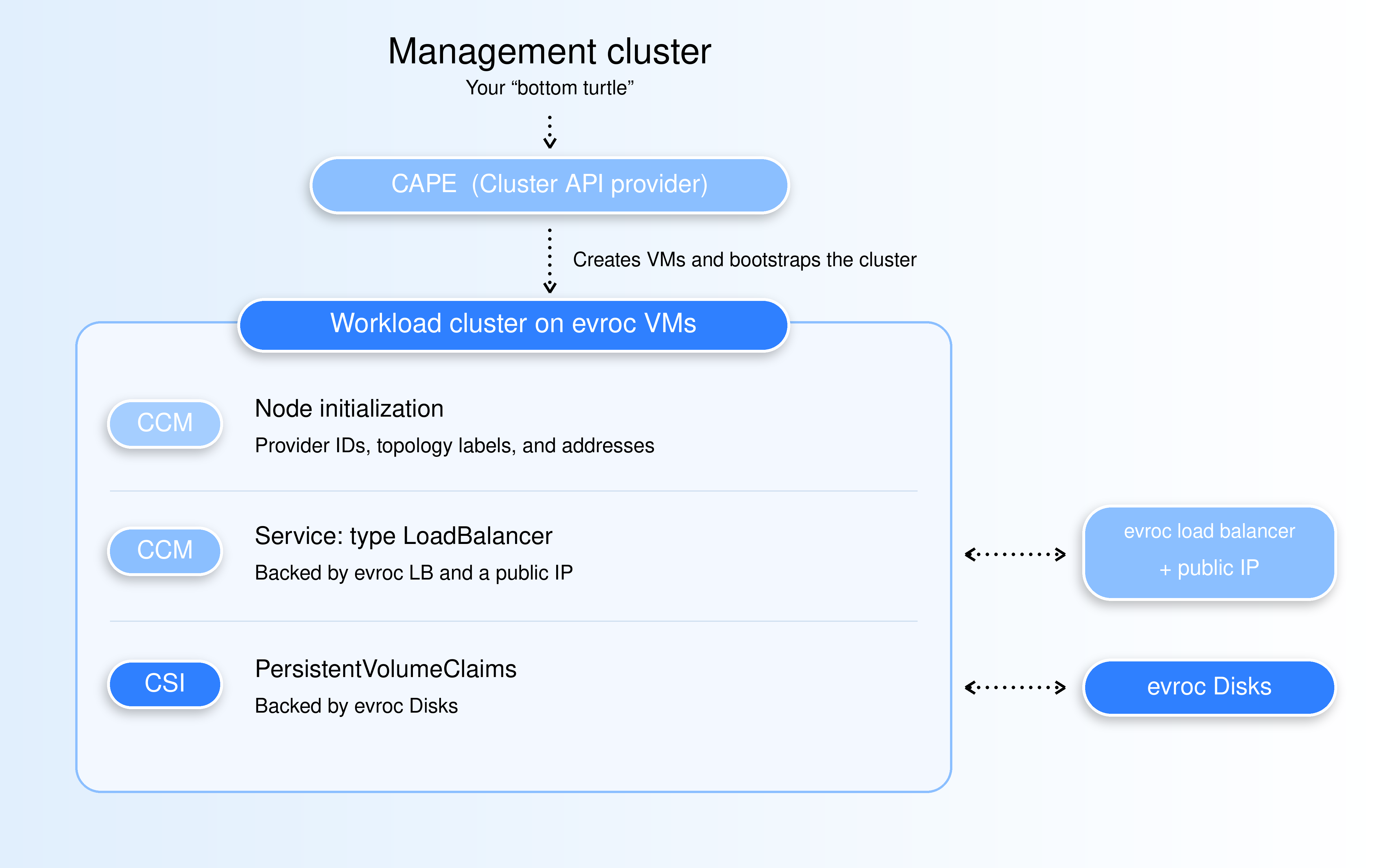
CAPE creates the VMs and bootstraps the cluster. It is a Cluster API infrastructure provider: you start from an existing management cluster (the "bottom turtle" in CAPI), install CAPE and the Cluster API core providers into it, and store an evroc service account's credentials as a secret. From then on a cluster is a declarative resource: apply a Cluster in the management cluster and CAPE converges reality to match. Scaling a node pool means editing a MachineDeployment; upgrading Kubernetes is a rolling operation with cordon, drain, and health checking built in, not a bespoke script.
Once the cluster is running, the CCM initializes each node: region and zone topology labels, addresses, provider IDs. It is also the component that backs type: LoadBalancer services with real infrastructure, provisioning an evroc load balancer, public IP, and backend pool per service. Traffic arrives at the public IP, gets forwarded from the load balancer to a node port, and continues on to the service. (Keep the 30000-32767 node-port range open in your security group or the load balancer can't reach your nodes.)
The CSI driver closes the loop with storage. It runs as two pieces: a controller that talks to the evroc API to create and attach evroc Disks when a PersistentVolumeClaim shows up, and a node plugin DaemonSet that formats and mounts the disk into your pod. Volumes are created in the same zone as the node your pod lands on, which is why the driver depends on the CCM's labels rather than running alongside it.
That dependency chain is the whole story of a deployment's ordering:
- Provision the cluster (CAPE, or the Terraform k3s example for a throwaway test cluster).
- Run kubelets with
--cloud-provider=externalso the CCM, not the distribution's built-in controller, initializes nodes. - Install a CNI. The CCM runs as pods, so it needs a working network.
- Install the CCM. Nodes go
Ready, get their labels, and drop the uninitialized taint. - Install the CSI driver, which consumes the
topology.kubernetes.io/zonelabels the CCM just set.
Each component authenticates to the evroc API with its own service account: CAPE with compute and networking permissions, the CSI driver with kubernetesCSIAgent, the CCM with kubernetesCCMAgent. Individual roles, individual blast radius.
The end state is a cluster that behaves like it was built for the cloud it runs on. Head to the deployment guide that walks through the whole flow, and our earlier introduction to CAPE covers the CAPI side in depth.
Path two: Rancher Prime
The second path, using Rancher Prime, offers an alternative automation path. By running Rancher Prime either inside evroc cloud, on an evroc VM, or outside it entirely, and using it to provision and manage clusters that delegate infrastructure creation to evroc. Rancher gives you a management UI over every cluster it creates: centralized RBAC, app catalogs, multi-cluster observability, and RKE2 as its built-in distribution.
Two deployment topologies work. Rancher can run on an evroc VM and manage clusters in the same cloud, or it can run outside evroc, in your existing datacenter or another cloud, and reach into evroc over the API to create the underlying infrastructure. The second topology matters if Rancher is already your fleet manager and you want evroc to be one more backend rather than a new place to run the manager itself.
Rancher-provisioned RKE2 clusters run on evroc VMs, so the evroc CCM and CSI driver still provide node initialization, load balancers, and persistent disks. The RKE2-specific knobs are documented: set disable-cloud-controller: true, add kubelet-arg: ["cloud-provider=external"], and keep node names equal to the evroc VM names, since the CCM looks VMs up by node name.
The evroc Rancher Agent Skill packages this workflow so tools like Claude Code, Hermes, or Cursor can provision and manage Rancher-backed clusters on evroc for you, through the same Terraform and evroc APIs you would use by hand.
Which path is yours
The choice is about which model you want for cluster lifecycle:
- If your team thinks in YAML and GitOps, and wants clusters as declarative resources with first-class scaling and rolling upgrades, take the CAPE path. The component docs are the map: self-managed overview, CAPE, CSI driver, CCM.
- If you want a UI over a fleet of clusters, RKE2, and centralized management, take the Rancher path listed above, with the index page as your starting point.
And if what you actually want is for evroc to run the control plane so your team only sees workloads: managed Kubernetes is coming soon. Watch this space.
Where to go next
- evroc Kubernetes overview - both paths, side by side.
- Deploy a self-managed cluster - the end-to-end walkthrough with ordering and config.
- CAPE introduction - why Cluster API and how the bottom-turtle pattern works.
- evroc Rancher Agent Skill - provision and manage Rancher clusters on evroc from your coding agent.
Written by