A Tour of the evroc Cloud


If you're landing a workload on a new cloud, you need more than a service list. You need to know how each service operates, how they connect and how they support the applications and projects you are building.
To help you with this, this tour walks you through evroc's cloud services in the order you would build something: network first, compute next, storage underneath, traffic in front, and AI on top. To make it concrete, we can look at how a developer would build an AI document processing platform for a government agency.
But first, let's start with a quick introduction to evroc:
evroc - A Quick Overview
evroc is a sovereign cloud built entirely in Europe. The platform is European-owned and European-operated, which means your data, your workloads, and your AI inference stay under European control. For a government agency this is not just a nice-to-have but a procurement requirement.
The services on this tour are:
| Category | Service | What it is |
|---|---|---|
| Networking | VPC | Isolated private network for a project |
| Networking | Subnet | Zonal IP range inside a VPC |
| Compute | Virtual Machines | On-demand VMs, CPU/GPU, cloud-init |
| Compute | Disks & Snapshots | Persistent block storage for VMs |
| Storage | Object Storage | S3-compatible storage for unstructured data |
| Storage | File Store | Shared file systems for multiple VMs |
| Networking | Load Balancer | L4 TCP load balancer for public ingress |
| AI | Think Models | Model-as-a-service inference |
Introduction to roc
Built directly into the evroc console is roc. This is an AI Agent that can answer questions and provide insights on evroc. roc will become the central station for all things to do on evroc.
AI Document Processor Example
A government agency needs a platform to process citizen requests like intake forms, supporting documents and legal correspondence. The platform ingests PDFs, uses an LLM to extract structured data including names, dates, case numbers, relevant clauses and claims.
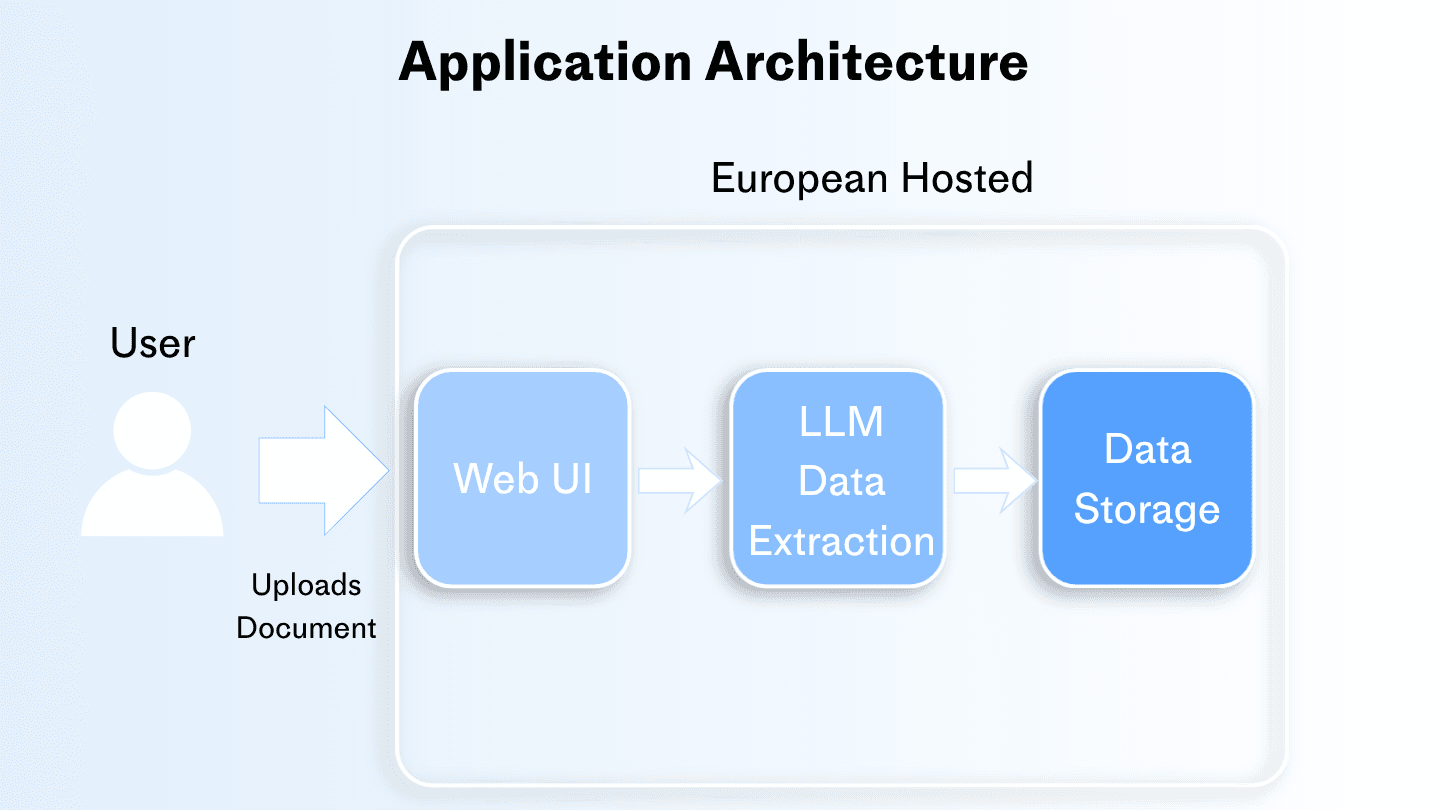
The platform then stores everything, and serves a web UI for caseworkers to review and annotate the results. Given the sensitive and critical nature of this workload, every document, every prompt, every model response must stay in Europe.
Networking
VPCs
The document processing platform needs a private network where the web tier, processing workers, and storage can talk to each other without exposing internal traffic to the internet. We will need a VPC (Virtual Private Cloud) to act as a private network for our project.
When we create a project, evroc gives you a default VPC automatically. It spans all availability zones in the region. This allows VMs in different zones to talk to each other over a private network without touching the public internet.
Subnets
Our project requires a high level of redundancy due to its critical nature. We need to make sure our environments are kept up and running separately in case either of them encounter issues. For example, our web tier and document process should operate in separate zones and we can use subnets for this.
A subnet is a slice of a VPC tied to one availability zone. It defines the IP addresses that our VMs get. The default VPC comes with one subnet per zone, so we can launch VMs in any zone without configuring networking first. By placing VMs in different subnets across different zones, a failure in one zone does not take down your whole platform.
Compute
Virtual Machines
The next thing we need is two servers: one running a FastAPI web app for caseworkers to upload and review documents, and one running the document processing pipeline that calls the LLM. Both being in the same VPC allows them to communicate over the private network.
Within evroc, we can pick a profile for our VMs (general-purpose, memory-optimized, compute-optimized, or GPU), choose a zone, attach a boot disk, and launch. Cloud-init lets us configure the machine at first boot, so you can install packages and set up services without SSHing in.
Storage
Since the data we are working with is a critical part of our application, we need our data to outlive a single VM, have flexible API access and also be shared across VMs for different workloads.
evroc has three storage services for different access patterns:
| Service | How you access it | Best for |
|---|---|---|
| Disks | Attached to one VM | Databases, apps needing fast local I/O |
| Object Storage | S3-compatible API over the network | Backups, logs, data lakes, static assets |
| File Store | Shared mount across multiple VMs | CMS, shared dev environments, legacy migrations |
Disks
We can attach a data disk to the worker VM for a local cache of processed documents. If the worker VM needs to be replaced, the disk detaches and reattaches to a new VM with the cached data intact. This way our data outlives any single VM, and snapshots allow us to roll back or duplicate a working setup.
Object Storage (Buckets)
Object Storage within evroc is an S3-compatible service for unstructured data. We can create a bucket, drop in files via the CLI or any S3-compatible tool, and access them from anywhere: a VM, our laptop, a pipeline.
When a caseworker uploads a document through the web UI, the app writes the PDF to a bucket. If for some reason the VM crashes, we need our documents to be safe. Our data needs to live outside any single VM for durability and is accessible from anywhere via the S3 API.
We can create a bucket to store every ingested PDF and the extracted JSON metadata alongside it.
File Store
File Store is a shared file system that multiple VMs can mount at the same time. Unlike a disk, which attaches to one VM, a File Store lets several VMs read and write the same files. We can also mount a File Store on both the web VM and the worker VM.
For our application, when a caseworker uploads a document, the web app writes a processing job to the File Store. The worker VM picks it up, processes it, and writes the result back. Both VMs see the same files without copying data around.
The benefit is shared state across VMs: when multiple workers need access to the same files, File Store gives us a single source of truth.
Load Balancer
The evroc load balancer is an L4 TCP load balancer. It takes incoming TCP traffic from the public internet and distributes it across a pool of our VMs. The configuration has four layers: the load balancer holds a public IP and defines listeners (port 443, port 80, etc.), each listener routes to a backend service, and each backend service points to a pool of VMs.
Caseworkers will access our AI platform through a single URL. To prevent a single point of failure behind this URL, we can use a load balancer. In this way if the web VM in zone A is down, the balancer routes to the backup in zone B. The load balancer allows us to expose one stable public address, and the load balancer spreads traffic across multiple VMs.
evroc Think Models
evroc Think Models is a managed AI inference platform. evroc hosts leading open source models that can be consumed through an OpenAI-compatible API. We can either deploy a dedicated model instance for exclusive use, or use a shared model endpoint that's already running. Because the API is OpenAI-compatible, existing SDKs work without modification.
We can make calls to our LLM (Large Language Model) for the data extraction and analysis. These can be names, dates, case numbers and any other relevant legal clauses. The worker writes the results to the bucket and then we can use the API and get model responses.
The Full Application on evroc
Here is the complete setup for the document processing platform, from network to inference:
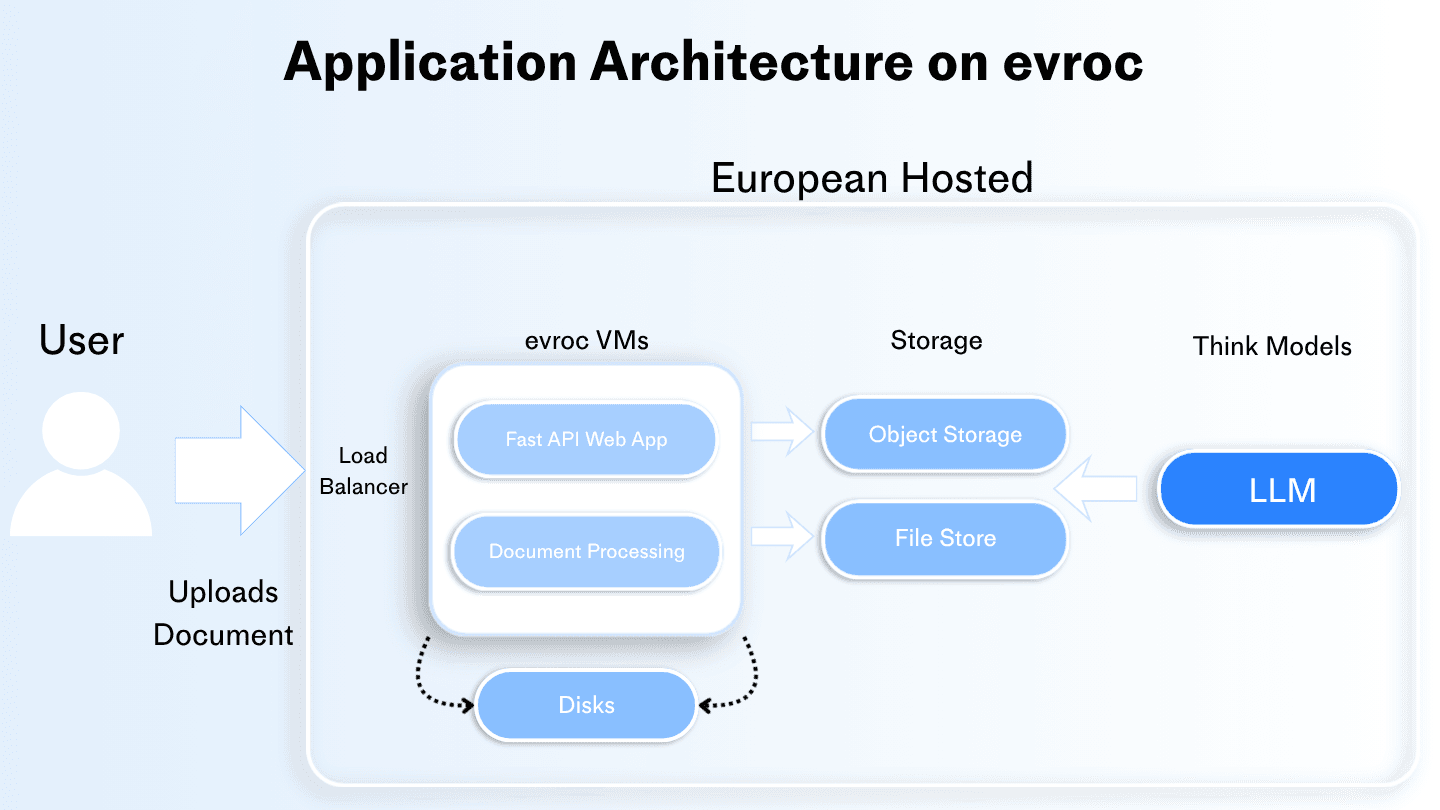
Caseworkers upload documents through the load balancer to the web VM. The web VM writes PDFs to the Object Storage bucket and processing jobs to the File Store.
The worker VM picks up jobs, calls Think Models to extract structured data, and writes results back to the bucket. Every document, every prompt, and every model response stays on European-controlled infrastructure on evroc.
Where to go next
This was only a sample of the applications that you can start building on evroc.
To get started building and deploying your own applications create an account here
The European Cloud